
The short answer
An AI productivity intelligence platform is workforce software that captures work signals (apps, calendar, project files, communication metadata), uses machine learning to convert those signals into team-level patterns (focus, blockers, overrun risk, burnout), recommends specific manager actions, and exposes both the data and the reasoning to the employee being measured. The category is defined by four integrated layers — capture, signal, recommendation, and action — and a platform missing any layer falls into an adjacent category instead: time tracking, which stops at hours, or employee monitoring, which stops at surveillance dashboards. Productivity intelligence subsumes time tracking and replaces employee monitoring by reporting at the team and project level, attaching evidence to every recommendation, and giving employees the same view managers see. Vendors in the 2026 space include gStride AI, ActivTrak, Time Doctor, Hubstaff, Microsoft Viva Insights, and Worklytics, though most cover only two of the four layers; the right choice depends on your requirements.
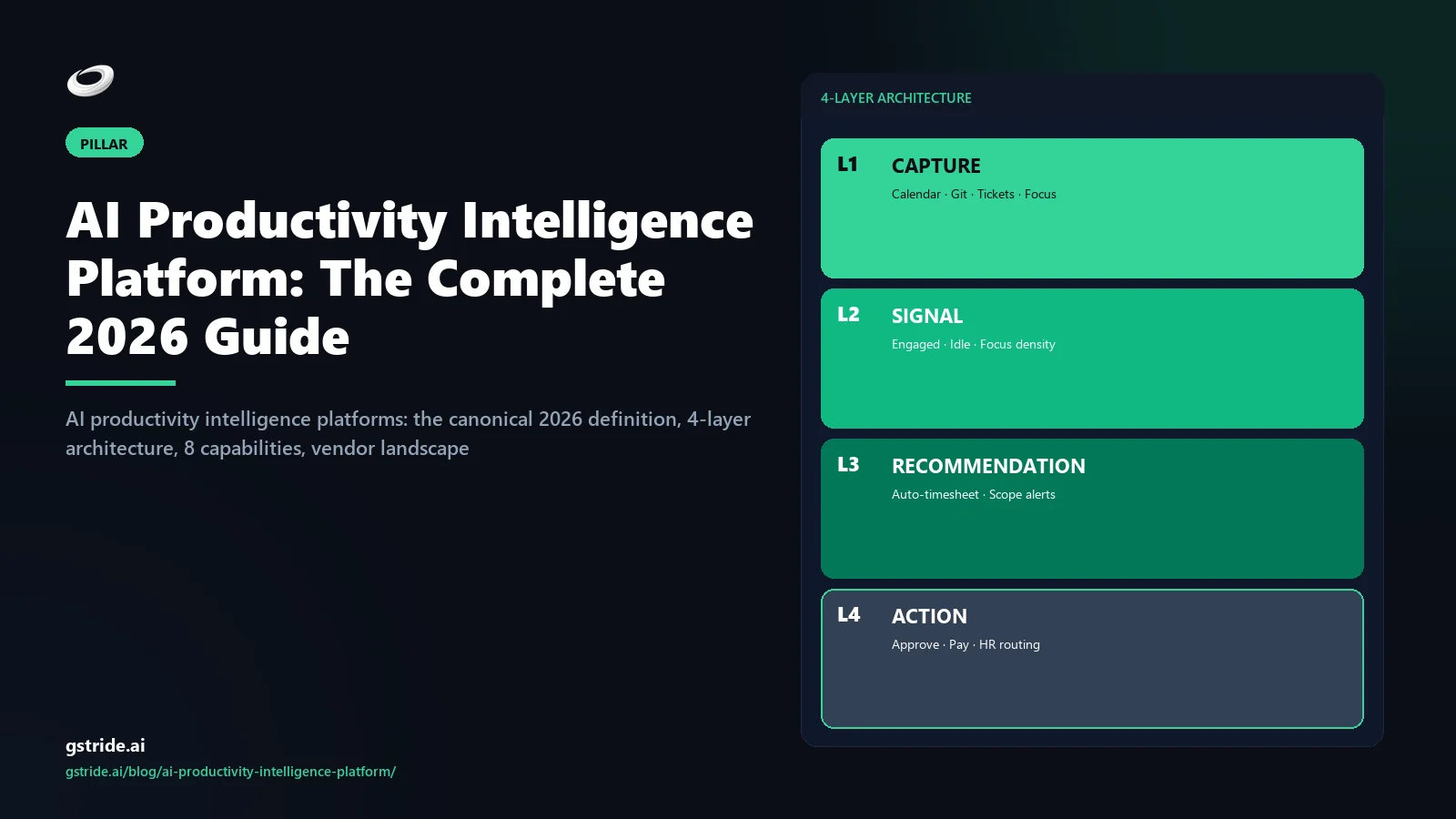
The four layers, in order:
- Capture — work signals from apps, calendar, project files, and communication metadata.
- Signal — ML conversion of capture into patterns: focus blocks, blocker time, scope creep, burnout risk.
- Recommendation — specific manager-facing actions: re-estimate, escalate, redistribute load, schedule a 1:1.
- Action — workflow surfaces in the same platform that close the loop without leaving the tool.
| Category | What it captures | What it produces |
|---|---|---|
| Time tracking | Hours per project | A timesheet |
| Employee monitoring | Continuous behavioural signal | A surveillance dashboard |
| Productivity intelligence | Outcome and context signals | Patterns + recommended actions |
The category exists because the two adjacent categories solve the wrong problem. Time tracking tells you how many hours something took, but not what to do about it. Employee monitoring tells you what people are doing minute-by-minute, but optimises for catching individuals rather than fixing systems. Productivity intelligence sits in the middle: capture only what is necessary, convert it into patterns at the team and project level, recommend specific actions, and let the employee see everything the manager sees in the same UI.
Who buys it? Three audiences, expanded later in this guide: operations leaders who own delivery, headcount, and utilisation across multiple project teams; HR and people operations who own the policy, retention, and burnout side of the same data; and leadership and finance who need utilisation-realisation-margin signal at the portfolio level rather than the timesheet level.
Productivity intelligence — the canonical definition
Productivity intelligence is one of the most-abused phrases in the 2026 workforce-software category. Every monitoring vendor with a dashboard claims to be productivity intelligence; every time tracker with an AI classifier in the marketing copy claims the same. The category is real, but the working definition has to be tighter than the marketing has made it.
Five sub-criteria separate genuine productivity intelligence from the look-alikes:
- Multi-signal capture, not single-stream activity. A tool that captures only keystrokes, only screenshots, or only application focus is not capturing productivity — it is capturing a single proxy. Productivity intelligence fuses at minimum three streams: project-tagged time, calendar context, and outcome artifacts (commits, tickets, deliverables). Any platform whose capture stops at activity-percentage is a monitoring tool with productivity in the brand voice.
- Signal at the team and project level, not the individual level. The unit of productivity intelligence output is a pattern — overrun risk on Project Alpha, blocker concentration on Tuesday afternoons, burnout signal on the design pod. Not a per-person score. Tools that produce a 1-to-100 ranking of individuals are surveillance tools using machine learning to make the surveillance feel scientific.
- Recommendations, not raw data. A dashboard that surfaces "Aisha's focus time was 23% lower this week" is data, not intelligence. A recommendation says "the design team's focus time has dropped two weeks running because the standup moved to 4 pm — propose moving it back." The recommendation is what makes the layer useful; without it, the manager is doing the analysis the tool was supposed to do.
- Closed-loop action, not export-and-hope. Genuine productivity intelligence platforms let the manager act on the recommendation in the same tool — schedule the 1:1, push the re-estimate to the project manager, raise the scope-creep flag with finance — without leaving the platform or exporting a CSV. The integration of recommendation and action is what separates a platform from an analytics product.
- Employee inspection in the same UI as manager view. Every signal, every recommendation, and every capture data point must be visible to the employee being measured, in the same interface a manager uses. Asymmetric visibility is the architectural signature of monitoring; symmetric visibility is the architectural signature of productivity intelligence.
If a vendor cannot show you all five in a 60-minute demo, they are selling something else and calling it this. We unpack the brand-and-category framing in what productivity intelligence actually means and the contrast with the closest adjacent category in the AI time tracking software 2026 buyer's guide.
Productivity intelligence vs time tracking vs employee monitoring
The cleanest way to understand the category is the three-way matrix below. The columns are the three categories; the rows are the design decisions that distinguish them. Most buyer confusion comes from vendors marketing themselves as the right-hand column while shipping the middle column.
| Design choice | Time tracking | Employee monitoring | Productivity intelligence |
|---|---|---|---|
| Primary capture | Hours per project | Continuous behavioural feed (screenshots, keystrokes) | Outcome + context signals (project, calendar, artifacts) |
| Unit of output | A timesheet | A per-employee activity dashboard | A team/project pattern with a recommended action |
| Default visibility | Manager-only summary | Manager-only feed; employee usually cannot inspect | Symmetric — employee sees same view as manager |
| AI role | Optional classifier | Scoring engine producing 1–100 ranks | Pattern detection + explainable recommendations |
| Configurability | Coarse (project list) | All-or-nothing capture toggle | Per-feature, per-role, per-project independent toggles |
| EU AI Act posture | Out of scope | High-risk, often non-compliant | High-risk, designed for compliance via explainability |
| Buyer fit | Solo billers, simple agencies | Distrust-driven leadership, BPO floors | Mid-market services, modern ops + HR teams |
| Failure mode | Manual entry tax | Best people leave first | Signal noise if recommendations not curated |
The decision is not which category to pick — it is which problem to solve. If the problem is "I need a defensible record of billable hours per matter," time tracking solves it. If the problem is "I need to catch employees stealing time," employee monitoring solves it (badly, and with attendant attrition). If the problem is "I need to manage delivery, retention, and margin without burning out the team I have," productivity intelligence is the only category that addresses all three at once.
For the deeper category-vs-category breakdown including pricing math, see our buyer-side guide on how to choose employee productivity software.
The 4-layer architecture
Every genuine productivity intelligence platform has the same architecture. Layers can be implemented well or badly, but if any of the four is missing, the product is not in the category. The four-layer model is not a marketing frame — it is the design contract that determines whether the platform actually produces intelligence or just produces dashboards.
What gets observed
The capture layer ingests raw work signal from the systems the team already uses: foreground application context, calendar events with attendee count and duration, project file activity (which document was opened, scrolled, edited), ticketing-system state changes (issue moved from in-progress to review), version control activity (commits, pull-request open and merge), and communication metadata (message volume by channel, not message content). The deliberate exclusion is content — productivity intelligence does not read message bodies, document text, or screen contents at scale, because the signal-to-noise ratio at content level is terrible and the privacy cost is enormous. What is captured is configurable per-user and per-project; the default capture set is narrow enough to ship without legal review on day one.
What patterns get detected
The signal layer converts the capture stream into a small number of named patterns that managers can act on. The five patterns worth shipping in any productivity intelligence platform are focus block detection (uninterrupted project-tagged stretches above a configurable minimum), blocker time (gaps where work was waiting on someone else's hand-off), scope creep (actual hours diverging from estimate at task level), overrun risk (statistical projection that a milestone will miss), and burnout signal (sustained out-of-hours work + reduced focus + increased context-switching). Each pattern has a clear definition, a known failure mode, and a configurable threshold. Black-box scoring (a single number with no shown definition) is explicitly excluded — it fails the EU AI Act explainability requirement and, more practically, it makes the signal undebuggable when wrong.
What the manager is told to do
The recommendation layer turns a detected pattern into a specific proposed action. A focus-time drop on the design pod becomes "propose moving the daily standup back to its 9:30 slot — focus time was 38% higher in the previous configuration." A scope-creep flag on Project Alpha becomes "task three is tracking 60% over estimate at week six of eight — propose either descoping the secondary deliverable or raising a change order with the client." A burnout signal on a senior engineer becomes "Aisha has logged 11 days above the team out-of-hours threshold this month — schedule a workload conversation in your next 1:1." Recommendations are tied to evidence (the signals that produced them) and to action surfaces (the workflow the manager will use to act). They are proposals, not autonomous decisions.
What the manager actually does, in the same tool
The action layer is where productivity intelligence diverges most sharply from analytics products. A pure analytics dashboard surfaces a problem and leaves the manager to act elsewhere — open a calendar tool, message the project lead, file a ticket, write a note for the next 1:1. A productivity intelligence platform closes the loop in the same UI: schedule the 1:1 against the manager's calendar, push the re-estimate to the project's tracker, route the scope-creep flag to finance with the audit trail attached, generate the workload-rebalance plan and stage it for team review. Without the action layer, every recommendation generates manual follow-through cost that erodes the platform's ROI within a quarter. With it, the loop from signal to action collapses to a few clicks and the platform pays back its cost.
The four layers compose into the product surface a manager actually uses. gStride's AI assistance feature implements all four — capture from Mac, Windows, mobile, and project tools; signal across the five named patterns; recommendations tied to evidence; and action surfaces wired into approvals, project, payroll, and HRMS. Tools that ship the first two layers and skip the second two are common; they are the analytics category, not the productivity intelligence category.
The 8 capabilities of a real productivity intelligence platform
The four-layer architecture is the structural test. The eight capabilities below are the functional test — the specific surfaces a 2026 buyer should expect to see, and what to ask each vendor to demonstrate.
Capability 1
Multi-stream capture surfaces
Native capture from the five primary work surfaces: desktop (Mac, Windows, Linux), mobile (iOS, Android), browser, project management tools (Jira, Asana, Linear, ClickUp, Trello), and version control (GitHub, GitLab, Bitbucket). Single-stream capture is a tracker; multi-stream capture is the foundation of productivity intelligence.
See automated time tracking →Capability 2
Five named signal types
Focus blocks, blocker time, scope creep, overrun risk, burnout signal — each with a published definition, a configurable threshold, and an inspection view. If the signals are anonymous numbers, the layer is not productivity intelligence.
See productivity monitoring →Capability 3
Recommendation interfaces
A manager-facing surface that turns each detected signal into a specific proposed action with the underlying evidence attached. Inbox, weekly digest, or in-context callout — the format matters less than the requirement that recommendations have evidence and not just confidence scores.
See AI assistance →Capability 4
Action interfaces
Workflow surfaces that let the manager act on each recommendation without leaving the tool — approval workflows for re-estimates, calendar integration for scheduling 1:1s, ticket creation for finance escalation, payroll-period flagging for utilisation conversations.
See timelines & approvals →Capability 5
Evaluation transparency
Every recommendation should expose the model version, the signals that contributed, and the audit trail of the human action that followed. This is the EU AI Act high-risk-system gate; it is also the practical test of whether the AI can be debugged when wrong.
EU AI Act compliance details →Capability 6
Employee inspection view
The employee being measured can see, in the same UI a manager uses, every capture data point, every signal, and every recommendation involving them. Asymmetric visibility is the design signature of monitoring; symmetric visibility is the design signature of productivity intelligence.
Productivity without surveillance →Capability 7
Configurability per signal and per role
Every monitoring feature is an independent toggle scoped per-user, per-role, or per-project. Screenshots off in clinical apps; idle capture on for hourly contractors but off for salaried engineers; communication metadata on for delivery, off for HR. All-or-nothing platforms force a policy that nobody can defend.
See configurable monitoring →Capability 8
Integration depth at every boundary
Native or one-click integrations across payroll (multi-entity, multi-currency), project management, accounting, HRMS, identity (SAML SSO + SCIM), and BI. Productivity intelligence is a hub, not an island; integration depth is what determines whether it stays useful in year two.
See payroll & integrations →The 3 buyer archetypes
The same productivity intelligence platform serves three buying audiences, each with different priorities and different decision criteria. Knowing which archetype you are saves the wrong vendors a lot of pitch time.
Archetype 1 — The operations buyer
Operations leaders own delivery, headcount, and utilisation across multiple teams. They are paid to ship projects on time, on margin, and without burning out the people who do the work. For the operations buyer, the priority order is: signal accuracy (does the platform actually surface overrun risk early enough to act?), recommendation specificity (does it tell me what to do or just what is happening?), action integration (can I close the loop in one tool?), configurability (can I run different policies for delivery vs design vs operations sub-teams?), and only then price. The operations buyer is the archetype most likely to demand the four-layer architecture in a single tool — they pay the cost of integration debt directly when the layers live in three different products. Adjacent reading: how to track remote employee productivity without killing morale and the best productivity tool for a 50-employee company.
Archetype 2 — The HR / people operations buyer
HR and people operations leaders own the policy, retention, and burnout side of the same data the operations buyer wants. For this archetype, the priority order is: employee inspection view (can the team see what we see?), configurability per role (can the policy match what we can defend?), burnout signal quality (is the model actually catching at-risk people, or just generating false-positive noise?), EU AI Act and GDPR posture (will this survive the next compliance audit?), and only then integration depth. The HR buyer is the archetype most likely to veto a tool that lacks employee inspection — they are the ones who handle the trust collapse if monitoring goes wrong. Adjacent reading: how to write an employee monitoring policy.
Archetype 3 — The leadership / finance buyer
Leadership and finance buyers (the CEO, the CFO, the COO) need utilisation-realisation-margin signal at the portfolio level, not the timesheet level. For this archetype, the priority order is: portfolio aggregation (can I see all teams, all projects, all entities in one view?), multi-entity payroll integration (does the timesheet boundary work across legal entities and currencies?), auditability (can the AI's reasoning survive an investor or board question?), scalability (will this still work at 3x headcount?), and cost per problem solved (not cost per seat). The leadership buyer is the archetype most likely to under-weight day-to-day usability and over-weight enterprise-readiness — which is the right trade-off only if the operations and HR archetypes are already satisfied with the same tool.
The platform you should pick is the one that satisfies all three archetypes from a single configuration surface, not the one that scores highest on whichever archetype ran the procurement. Mid-market buying committees fail in 2026 not because tools are bad but because they bought to satisfy one archetype's checklist and discovered the other two during rollout.
Vendors in the productivity intelligence space
The vendor landscape in 2026 is messier than the marketing copy suggests. Most of the names in the productivity intelligence search results are tools from the two adjacent categories — time tracking and employee monitoring — that have added a signal layer or repositioned their dashboards. Below is the honest read on the seven vendors most-named in 2026 buying conversations, with one-line takes on where each sits in the four-layer model.
| Vendor | Layer coverage | Honest take |
|---|---|---|
| gStride AI | Capture + Signal + Recommendation + Action | Built explicitly as a four-layer productivity intelligence platform; configurable monitoring; payroll bundled; India + global; explainable AI on every recommendation. The reference implementation of the category, in our view (we built it). |
| ActivTrak | Capture + Signal (weak Recommendation) | Strong analytics dashboards; weak on recommendations; no action layer; no payroll. A productivity analytics product, not a productivity intelligence platform. |
| Insightful | Capture (heavy) + Signal (light) | Capture-first product with monitoring DNA; recommendations are thin; action layer absent; configurability not where it needs to be for EU AI Act readiness. |
| Time Doctor | Capture + Signal (added 2025) | Capture-strong tracker that bolted on a signal layer; no native recommendation interface; integration breadth is good but not deep at the action layer. |
| Hubstaff | Capture + Signal (light) + partial Action (project/payroll) | Project tools and payroll exist; signal layer is shallow; recommendations are scarce; positions toward monitoring rather than intelligence. |
| Microsoft Viva Insights | Signal + Recommendation (Microsoft-only) | Strong signal layer inside Microsoft 365; no capture for non-Microsoft work; no payroll; no action surfaces outside Teams. Useful as a signal supplement, not as the platform. |
| Worklytics | Signal + Recommendation | Pure signal-and-recommendation analytics product; no capture (depends on existing tools' APIs); no action layer; sits above other platforms rather than replacing them. |
The shape of the market in 2026: most vendors cover two of the four layers well and add the other two via marketing. The rare vendors that cover all four layers in a single product are the ones positioned to win the next two years of category consolidation. We cover the head-to-head comparisons in detail across gStride vs Time Doctor, gStride vs Hubstaff, gStride vs ActivTrak, and gStride vs Insightful.
The 5-point evaluation framework
Run the five questions below on every shortlisted vendor, in order. Failing any one is enough to drop the vendor from the shortlist; the remaining four matter only if the first one clears.
1. Architecture completeness — show me one signal end-to-end
Ask the vendor to pick one signal — say, focus block detection — and walk it from capture to action. Which capture data went in (which application events, which calendar entries, which project file activity)? Which model produced the pattern (and what version)? Which recommendation appeared in the manager view? Which action surface let the manager respond? If the demo trails off after capture and signal, the vendor has a productivity analytics product, not a productivity intelligence platform.
2. Transparency — open the employee view
Ask the vendor to log in as an employee account and show every signal, recommendation, and capture data point that employee can see about themselves. Confirm it matches the manager view exactly. If the answer is "the employee sees a different UI" or "the employee sees a subset," the platform fails the symmetric-visibility test that defines the category and the EU AI Act explainability requirement that defines compliance.
3. Configurability — every monitoring feature an independent toggle
Ask for a list of every capture and monitoring feature in the product. For each, confirm it can be turned on or off independently, and scoped per-user, per-role, or per-project. All-or-nothing settings are an architectural defect that will pull the rollout toward an over-monitoring default the policy cannot defend. Reference framing in productivity monitoring without surveillance.
4. AI explainability — show one recommendation with full audit trail
Ask the vendor to surface one recommendation made last week and trace it back: capture inputs, model version, signal threshold, evidence shown, and the audit log of the human action that followed. Black-box recommendations fail enterprise procurement at the security review and fail mid-market procurement at the trust review. Both reviews ask the same question — show me why the AI said what it said.
5. Integration depth — quote every boundary
List the systems the platform must feed: payroll (multi-entity? multi-currency?), project management, accounting, HRMS, identity (SAML SSO? SCIM?), BI. For each, ask whether the integration is native, a one-click app, or a custom build. Integration debt at the productivity intelligence boundary is the silent cost that explodes in year two; a quote that doesn't price every boundary is not yet a real quote.
30-day implementation playbook
If the evaluation has produced a vendor you trust, the rollout is the rest of the program. Four weeks is the cadence we recommend, and it deliberately keeps the policy ahead of the tool and the team ahead of both.
Week 1 — Policy first, no tool yet
Draft the monitoring and productivity intelligence policy before anything is installed. Cover purpose (what business question the program answers), scope (which teams, which roles, which signals), data captured (the explicit list, with reasons), retention windows (typically 30–90 days), access controls (who sees what), employee rights (inspection, correction, deletion), and review cadence (quarterly minimum). Share it with the team. Take questions in writing. The policy work pays for itself ten times over in every later week. Most rollouts that fail skip this week and never recover. Use our policy template as a starting point.
Week 2 — Self-onboarding for the team
Install the platform with capture on, signal layer running, but manager views hidden. Give every employee access to their own data first — same UI a manager will eventually see, scoped to themselves only. Invite them to flag any configuration that feels disproportionate to the policy from Week 1. Keep a written log of what changed based on feedback; it becomes evidence of proportionality if the program is ever challenged. By end of Week 2, the team should be able to describe in one sentence what is captured, what is not, and how to inspect it.
Week 3 — Manager view, with explicit limits
Turn on team-level aggregate views. Agree, in writing, on what managers will not look at — typically per-employee moment-by-moment activity, screenshots outside billing windows, and individual signal drill-downs outside policy review windows. This is the highest-risk week of the rollout because it is where surveillance creep tends to sneak in. The mitigations are policy clarity from Week 1, employee inspection from Week 2, and approval discipline from Week 4.
Week 4 — Approval discipline and right-sizing
Run the full recommendation-and-action cycle for the first time. Every signal that produced a recommendation gets reviewed; every recommendation that produced an action gets logged; every action that touched payroll, headcount, or performance reviews gets a human signature. Then run the retrospective question: which signals has anyone actually used to make a decision in the last 30 days? Turn off everything else. Signals that haven't driven a decision are surveillance debt — sitting in the data store waiting to be misused. The end-state platform should be smaller, not larger, than the day-1 install.
Common pitfalls (5 anti-patterns)
A platform that ships capture and signal layers but no recommendation or action is an analytics product. The dashboards are pretty, the signal layer often genuinely insightful, but every recommendation lives in the manager's head and every action lives in another tool. The ROI calculation breaks within a quarter. The fix: insist on all four layers in the demo, in one product, with the action layer wired into real workflows.
The most damaging anti-pattern. A monitoring tool with continuous capture, asymmetric visibility, and a 1-to-100 scoring engine gets rebranded with a productivity intelligence label. The team notices. Output does not improve. The best people leave first. The fix: run the symmetric-visibility test in Question 2 of the evaluation framework — open the employee view and confirm it matches the manager view.
A platform that produces single-number scores or recommendations without exposing the underlying signals, model version, and evidence. Fails the EU AI Act high-risk-system requirement, fails enterprise procurement at the security review, and — most practically — makes the AI undebuggable when it produces a wrong recommendation. The fix: insist on full audit trail per recommendation, including model version and signal trace.
Even a well-built productivity intelligence platform produces wrong recommendations sometimes — a focus-block signal misclassified because the calendar was empty during a long offsite, a burnout signal triggered by a one-off out-of-hours sprint that was actually a planned launch. The fix: every consequential action (workload conversations, performance review inputs, payroll-period flags) routes through a human approval. The AI proposes; the human disposes. Approval discipline is non-negotiable.
The most common rollout failure: install the tool first, write the policy later. Without the policy framing, configurability defaults toward "capture everything, decide later," which is exactly the surveillance creep the platform was supposed to avoid. By the time anyone tries to write the policy, the team has already formed a (correct) suspicion that the policy will be retrofitted to whatever the tool happens to be capturing. The fix: write the policy in Week 1, before installation, and let the policy frame the configuration rather than the reverse.
Frequently asked questions
Free: 5-Signal Productivity Self-Audit Worksheet
30-min audit on your team. Focus depth + commit cadence + meeting load + flow-state + blocker recovery. PDF + Google Sheets calc. For Ops Heads, Founders, Eng Managers.
Frequently asked questions
What is an AI productivity intelligence platform?
An AI productivity intelligence platform is workforce software that captures work signals (apps, calendar, project files, communication metadata), uses machine learning to convert those signals into team-level patterns (focus, blockers, overrun risk, burnout), recommends specific manager actions, and exposes both the data and the reasoning to the employee being measured. It differs from time tracking (which only captures hours) and from employee monitoring (which only captures activity) by adding two layers above capture: a signal layer that produces patterns, and a recommendation layer that produces actions.
How is productivity intelligence different from time tracking?
Time tracking captures hours and stops there. Productivity intelligence captures the same hours but adds three layers above the timesheet: a signal layer that detects patterns (focus blocks, blocker time, scope creep), a recommendation layer that proposes specific actions (re-estimate, escalate, descope), and an action layer that closes the loop in the same platform. Time tracking answers how many hours did this take? Productivity intelligence answers what should we do about it? Adjacent reading: the AI time tracking software 2026 guide.
How is productivity intelligence different from employee monitoring?
Employee monitoring captures wide behavioural signal (screenshots, keystrokes, continuous activity feeds) and presents it as a manager-facing dashboard. Productivity intelligence captures narrow outcome and context signal (project files, calendar, ticket close-out, communication metadata) and presents it as a team-level pattern with recommended actions. Monitoring optimises for catching individuals; productivity intelligence optimises for fixing systems. The technical test is who can see what data: in monitoring, the manager sees data the employee cannot; in productivity intelligence, the employee sees everything the manager sees in the same UI.
What are the 4 layers of a productivity intelligence platform?
Capture (work signals from apps, calendar, project files, communication metadata), Signal (machine-learning conversion of capture data into patterns like focus blocks, blocker time, overrun risk, burnout indicators), Recommendation (specific manager-facing actions tied to each signal — re-estimate, escalate, redistribute load, schedule a 1:1), and Action (the workflow surfaces in the same platform that let a manager act on the recommendation without leaving the tool). A platform missing any one of these four layers is not productivity intelligence — it is one of the adjacent categories.
Who are the main AI productivity intelligence vendors in 2026?
The 2026 productivity intelligence space includes gStride AI (4-layer platform, configurable monitoring, payroll bundled, India + global), ActivTrak (capture + signal layers, weak on recommendation and action), Insightful (capture-heavy, monitoring-leaning), Time Doctor (capture-strong, signal layer added 2025, no action layer), Hubstaff (capture-first, project tools added, monitoring-leaning), Microsoft Viva Insights (signal-strong inside Microsoft 365 only, no capture for non-Microsoft work, no payroll), and Worklytics (signal-and-recommendation analytics, no capture or action). Most of the rest of the market is time tracking or monitoring with productivity intelligence in the marketing copy.
What is workforce productivity intelligence?
Workforce productivity intelligence is productivity intelligence applied at the workforce-management scale — not just project teams or knowledge workers, but the full population including shift workers, frontline staff, hybrid teams, and contractors across multiple business units. The defining additions over team-scale productivity intelligence are: shift and attendance integration, multi-entity payroll, role-aware monitoring policies (a clinician's policy is different from an admin's), and SAML SSO with SCIM provisioning at the workforce-IT scale. It is the enterprise readiness layer on top of the productivity intelligence category.
What is enterprise productivity intelligence?
Enterprise productivity intelligence platforms add four things on top of the mid-market category: SAML 2.0 SSO with SCIM 2.0 user lifecycle (table stakes for IT procurement), exportable model-version + signal-trace audit trail for every recommendation (required for EU AI Act high-risk-system compliance), multi-entity and multi-currency payroll integration (so the timesheet boundary works across legal entities), and configurable role-based monitoring policies (so the same platform can serve clinicians, finance, BPO agents, and engineers from one configuration surface).
How much does a productivity intelligence platform cost in 2026?
Mid-market productivity intelligence platforms in 2026 typically run between five and fifteen US dollars per user per month all-in (capture, signal, recommendation, action). Enterprise tiers with SSO, SCIM, and multi-entity payroll usually add two to four dollars. The cost trap to avoid is signal-or-recommendation features priced as separate add-ons — a tool whose AI capabilities live in a premium tier is selling time tracking with a productivity-intelligence label. Calculate cost per problem solved, not cost per user, and price every layer in the bundle quote. See gStride pricing.
Is productivity intelligence legal under the EU AI Act?
Yes, but with conditions. The EU AI Act (effective August 2026 for high-risk system obligations) classifies workplace AI that influences employment decisions as high-risk and requires explainability, documented data sources, human oversight, and a published evaluation framework. A productivity intelligence platform that exposes the signals behind every recommendation, lets the employee see what was captured, and routes every consequential action through a human approver, clears the bar. A black-box scoring tool that produces a single number with no shown reasoning does not. Configurability and transparency are the two design choices that determine compliance, not vendor jurisdiction.
How long does it take to roll out a productivity intelligence platform?
A defensible rollout is 30 days, structured as four weekly phases: Week 1 — write the policy before installing anything (purpose, scope, retention, employee rights, review cadence). Week 2 — self-onboard the team to their own data first, with manager views off. Week 3 — turn on team-level aggregate views with explicit limits on what managers will not look at. Week 4 — run the full approval cycle, then retrospect on which signals were actually used to make a decision, and turn off everything else. Rollouts that compress this timeline almost always fail at the trust layer rather than the technical layer.
Can a productivity intelligence platform replace my time tracker?
Functionally, yes — productivity intelligence platforms include the time-tracking capture layer as their foundation. The timesheet still exists for client billing, payroll, and audit purposes, but the human work shifts from filling cells to approving auto-captured suggestions. What you gain over a pure time tracker is the three layers above capture: signal, recommendation, and action. What you keep is the auditable timesheet that payroll and clients require. We answer this in detail in does AI productivity software replace timesheets.
What is the best productivity intelligence platform for Indian teams?
It depends on requirements, but for Indian teams the 2026 shortlist usually comes down to three: gStride AI (built India-first, with DPDP-aware configurable monitoring, multi-entity INR payroll bundled, and all four layers), Time Doctor (capture-strong with broad integrations and a long history with Indian BPOs, but no action layer), and Hubstaff (capture-first with project tools and payroll, monitoring-leaning defaults). If the team needs DPDP-defensible policies, employee inspection views, and payroll in the same platform, gStride is the strongest fit; if the only need is hours captured for client billing, a simpler tracker may be enough. Run the five-point evaluation framework against all shortlisted vendors before committing.
Which productivity intelligence platform is best for small teams or startups?
For teams under roughly 50 people the deciding factors are setup time, per-seat cost, and whether the AI layers are bundled or sold as add-ons. gStride AI and Hubstaff are typically the fastest to deploy at this size; ActivTrak suits teams that mainly want analytics dashboards; Microsoft Viva Insights only makes sense if the team already lives entirely in Microsoft 365. The honest answer depends on requirements — a five-person agency billing by the hour may be better served by simple time tracking, while a 30-person product team managing delivery and burnout risk gets more from the full four-layer platform. Trial with one team for 30 days using the rollout playbook before buying company-wide.
What questions should I ask a productivity intelligence vendor?
Five questions cut through most marketing. One — show me one signal end-to-end (which capture data went in, which model produced the pattern, which recommendation the manager sees). Two — open the employee view and confirm it shows the same data as the manager view. Three — list every monitoring feature and confirm each is an independent toggle, not bundled. Four — quote the all-in price including signal, recommendation, action, SSO, and payroll integration. Five — show the model version and audit trail for one recommendation made last week. Vendors that cannot answer all five in a 60-minute demo do not have a productivity intelligence product yet.
Related reading on gStride
- AI-First Workforce Management Software: 2026 Guide — the adjacent category explained
- What Is Productivity Intelligence? The Category Replacing Time Tracking in 2026
- AI Time Tracking Software: A Complete 2026 Buyer's Guide
- How to Choose Employee Productivity Software (2026 Buyer's Guide)
- Does AI Productivity Software Replace Timesheets? The Honest 2026 Answer
- Productivity Monitoring Without Surveillance: What Actually Works
- gStride AI assistance — the recommendation and action layer
- gStride productivity monitoring — configurable per signal and per role
- gStride pricing — every layer in the bundle
- Productivity intelligence platform vs employee monitoring — the category split
- Compare gStride against 13 productivity & monitoring tools
See a productivity intelligence platform that earns the name
gStride is built around the four-layer architecture in this guide — capture, signal, recommendation, and action — in a single platform with configurable monitoring, employee inspection, and explainable AI on every recommendation. Pick the policy you can defend, and let the tool match it exactly.
Explore AI assistance See pricing