
The short answer
Productivity intelligence is the category of AI-powered platforms that turn raw work activity (apps used, meetings attended, tasks completed, focus blocks, idle gaps) into structured signal about how people, teams, and organizations actually work — and then turn that signal into recommendations a manager or employee can act on. It replaces time tracking by answering not just “how many hours did this take” but “where is the friction, where is the focus, where is the burnout risk, what should we change about the workflow.”
A time tracker captures hours against projects and stops. A productivity intelligence platform captures hours plus context (which app, which meeting, which task) plus AI signal (focus pattern, blocker pattern, meeting overhead, burnout risk) plus recommendations (drop the Wednesday status sync, reassign the unblocked task, this team has lost 14% of its focus blocks in 4 weeks). The category exists because timesheets answer accounting questions, not management questions — and managers in 2026 are being asked to optimize outcomes, not staff utilization. (For the inverse question — whether the new layer means you can stop running timesheets at all — see does AI productivity software replace timesheets; the short answer is no, but the human work shifts.)
Productivity intelligence vs time tracking vs employee monitoring
The three categories overlap in the data they collect but differ sharply in what they produce. The collapse of these distinctions is the source of most buyer confusion.
| Category | What it captures | What it produces | Who it serves |
|---|---|---|---|
| Time tracking | Hours against projects, manual or automatic timer | Timesheets, invoices, payroll inputs | Finance, accounting, billing |
| Employee monitoring | Screenshots, keystrokes, app usage, web browsing | Activity reports, idle alerts, screenshot archives | Compliance, HR, security teams |
| Productivity intelligence | All of the above PLUS context (calendar, task systems, code commits, doc edits) | Signal (focus, friction, burnout) + recommendations + decisions | Managers + employees + leadership |
The categories are not interchangeable, and a tool that bolts an “insights” tab onto a time tracker is not a productivity intelligence platform — it is a time tracker with a chart. The category test is whether the tool produces a decision, not just a dashboard. If the manager has to manually read the dashboard, infer a pattern, and decide what to change, the tool stopped at signal. Productivity intelligence carries the loop one step further.
The 4 layers of productivity intelligence
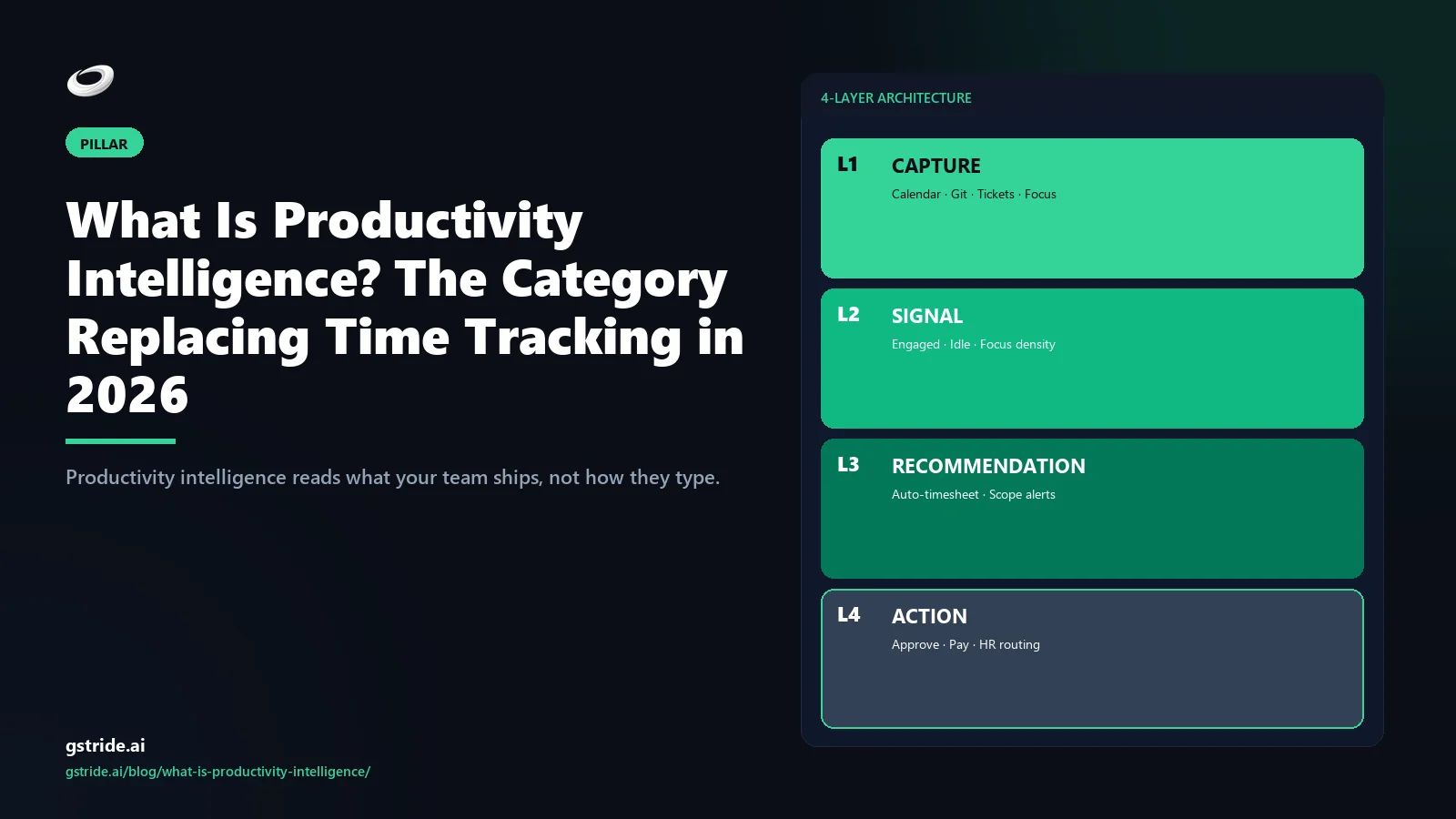
A productivity intelligence platform is built in four stacked layers. Each layer adds context the layer below cannot see, and most legacy time trackers stop at layer 1.
Layer 1 — Capture
Raw activity collection from the surfaces people actually work in: desktop applications, browser tabs, calendar events, communication tools, project tools, code repositories. Automated time tracking sits in this layer (for the definitional deep dive on this layer alone, see what is AI time tracking). Capture is necessary but not sufficient — capture without signal is just a log file.
Layer 2 — Signal
AI processing that turns raw events into structured signal. Examples: focus blocks (continuous deep-work periods on a single task), context-switching rate (apps switched per hour), meeting overhead (% of work hours in meetings vs solo work), blocker patterns (recurring waits in a workflow), burnout indicators (declining focus blocks over weeks). This is where AI idle detection and similar context-aware classifications live.
Layer 3 — Recommendation
The platform suggests specific, actionable changes based on the signal. Not “your team has 23% meeting time.” The recommendation layer says “Wednesday 2pm status sync has 8 attendees, 4 of whom never speak; meeting overhead for these 4 is 3 hours/week; suggest async update.” Recommendations are scoped, attributed, and reversible.
Layer 4 — Action
One-click apply or human-confirmed execution. The platform creates the calendar change, posts the async template to Slack, reassigns the blocked task — or queues the change for the manager to approve. Action without confirmation is automation; action with confirmation is the work loop closing. Most legacy tools do not have this layer at all.
Real examples: what each layer looks like in practice
Concrete examples make the layers easier to evaluate.
Example 1 — Idle detection
A naive time tracker logs 47 minutes idle Tuesday afternoon and pauses the timer. A productivity intelligence platform notices the calendar shows a 1:1 in a meeting room (laptop closed, phone on), classifies the time as a meeting, and confirms with a one-click prompt the next morning. The 47 minutes are correctly attributed without the employee defending it. More on AI-based idle detection.
Example 2 — Meeting overhead
The signal layer flags that engineers on Team A have lost 31% of their focus blocks since Q2 because of new cross-functional standups. The recommendation layer proposes consolidating 3 standups into 1 weekly + async daily updates. The action layer creates the calendar change and the async template. The manager confirms the move; the change ships.
Example 3 — Burnout signal
Across an 8-week window, an employee’s evening-and-weekend activity has climbed steadily while their focus-block length has dropped — both signals of overload before any HR self-report. The platform flags the pattern to the employee (not just the manager) with a private nudge: “Your work pattern in the last 4 weeks suggests overload; here is a focus-block-protection toggle.” The employee decides; the manager only sees what the employee chooses to share.
None of these are exotic. They are the bread-and-butter operating decisions any reasonable manager wants to make — but cannot, because the data is locked in five different tools and nothing connects it.
Why the category matters for buyers
Productivity intelligence buying happens in a different room than time tracking buying. Time tracking is purchased by the finance buying-center for invoicing and payroll inputs. Employee monitoring is purchased by the security or HR buying-center for compliance. Productivity intelligence is purchased by the operations or analytics buying-center to make management decisions — which means the buyer is asking different questions of the vendor.
A time tracking buyer asks “does it integrate with QuickBooks?” A productivity intelligence buyer asks “what decisions does this surface that I cannot make today?” The vendor that confuses the two will either oversell features the finance buyer does not need or undersell the decision layer the operations buyer is actually paying for. The category distinction is also why mid-market buyers with operational complexity (50-500 employees, multiple verticals or shifts) are leaving timer-only tools faster than enterprise or true SMB — they have outgrown timesheets but cannot afford a 12-month BI implementation.
Vendors in the productivity intelligence space
The category is emerging in 2026 and the vendor lineup reflects it: a handful of full-stack platforms, a larger pool of legacy tools with bolted-on insights tabs, and a few BI-adjacent products migrating in from the analytics direction.
- gStride — built end-to-end as a productivity intelligence platform across all four layers (capture, signal, recommendation, action), with screenshots and keystroke capture configurable or off by default. Strong fit for mid-market with shifts, payroll, and multi-vertical operations.
- Microsoft Viva Insights — strong layer 2 signal for Microsoft 365 environments; layers 3 and 4 are limited to Microsoft surfaces and require a Premium add-on for richer recommendations.
- ActivTrak Coach — strong activity capture (layer 1) and an emerging coaching layer; the platform leans toward employee monitoring framing (screenshot-heavy by default), which makes it land differently in operations-led buying decisions.
- Hubstaff, Time Doctor, Toggl Track — time trackers with monitoring add-ons, not productivity intelligence platforms. They serve the finance and compliance buying-centers well and the operations buying-center poorly. See gStride vs Hubstaff and gStride vs Time Doctor for the side-by-side.
- Tableau / Power BI workforce dashboards — strong layer 2 signal if you have an analyst building it, but no layer 1 capture and no layer 3/4 action. They are tools to build productivity intelligence, not productivity intelligence platforms.
The split between “tool to build it” and “platform that ships with it” is the cost question. A BI-rolled solution costs 3-9 months of analyst time and ongoing maintenance. A purpose-built productivity intelligence platform costs the SaaS subscription and a 1-2 week rollout. The right answer depends on whether you have the analyst time and the data engineering bench to maintain a custom build — most mid-market companies do not.
Where this category is going
Two forces are pulling the productivity intelligence category from emerging to established. First, the EU AI Act’s August 2026 high-risk rules for workplace AI raise the compliance bar on activity-capture tools — the platforms that already separate signal from surveillance and operate transparently are moving fastest, and the ones that bolted insights onto a screenshot tool are facing rework. Second, mid-market buyers who outgrew timer-only tools but cannot fund a 12-month BI build are creating real pull for purpose-built productivity intelligence platforms. The combination is what turns a category from analyst-coined vocabulary into a real budget line.
The practical guidance for buyers in 2026: ask vendors which layers they ship out of the box, ask what decisions surface that you cannot make today, and ask how the tool treats the employee — as the subject of monitoring or as a participant in the platform. The tools that answer those three questions cleanly are the ones to shortlist. The tools that pivot the conversation back to timesheets and screenshots are not productivity intelligence — they are time tracking with better marketing. For the deeper category-canonical walkthrough — four-layer architecture, eight platform capabilities, vendor landscape, and 30-day rollout — see our AI productivity intelligence platform pillar guide. For a structured 12-question vendor scorecard you can run in a single demo call, see how to choose employee productivity software; for vertical-specific buying (e.g. matter-based billing where the timesheet is also the legal record) see law firm time tracking and billing software.
Free: 5-Signal Productivity Self-Audit Worksheet
30-min audit on your team. Focus depth + commit cadence + meeting load + flow-state + blocker recovery. PDF + Google Sheets calc. For Ops Heads, Founders, Eng Managers.
Frequently asked questions
What is productivity intelligence?
Productivity intelligence is the AI-driven category that turns raw work activity (apps used, meetings attended, tasks completed, focus blocks) into actionable signal about how people, teams, and organizations work. It replaces time tracking by answering not just “how many hours did this take” but “where is the friction, where is the focus, where is the burnout risk, what should we change.”
How is productivity intelligence different from time tracking?
Time tracking captures hours against projects. Productivity intelligence captures hours plus context (which app, which meeting, which task) plus AI signal (focus pattern, burnout risk, blocked work, meeting overhead) plus recommendations (drop this meeting, reassign this task, the team is heading toward overload). Time tracking ends at the timesheet. Productivity intelligence ends at the decision.
What are the 4 layers of productivity intelligence?
Layer 1 capture (raw activity from desktop/web/calendar). Layer 2 signal (AI-derived focus, idle, meeting overhead, blocker patterns). Layer 3 recommendation (suggested changes — meeting cuts, workload rebalance, focus-block protection). Layer 4 action (one-click apply or human-confirmed change). Each layer adds context the previous one cannot see, and the category test is whether a vendor reaches layers 3 and 4 or stops at a dashboard.
Is productivity intelligence the same as employee monitoring?
No. Employee monitoring captures activity to police behavior (screenshots, keystrokes, web browsing) for the manager. Productivity intelligence captures activity to inform decisions (where is friction, where is focus) for managers AND employees. The classification is transparent, the surveillance components are configurable or off by default, and the goal is fewer meetings and better outcomes — not catching people slacking. See productivity monitoring without surveillance for the philosophical separation.
Which vendors offer productivity intelligence?
The category is emerging in 2026. gStride is built end-to-end as a productivity intelligence platform (capture + signal + recommendation + action). Microsoft Viva Insights and ActivTrak Coach offer signal layers but lean toward analytics dashboards. Hubstaff, Time Doctor, and Toggl are time trackers with monitoring add-ons — not productivity intelligence. The differentiator is whether the tool produces decisions, not just dashboards.
Do I need productivity intelligence if my team is under 25 people?
Probably not yet. Under 25 employees, a manager can hold the operating picture in their head — meetings, blockers, focus, workload — and a timer + project tool covers the finance side. Productivity intelligence pays back at 50+ employees, multi-vertical operations, or shift-based work where the operating picture exceeds what one manager can reconstruct manually.
Is productivity intelligence the same as AI time tracking?
No, but they are related. AI time tracking automates the capture layer — classifying hours to projects and tasks without manual timers. Productivity intelligence is the larger four-layer stack that adds signal, recommendation, and action on top of that capture. Every productivity intelligence platform includes AI time tracking; not every AI time tracker is a productivity intelligence platform. See what is AI time tracking for the capture-layer definition.
What is the best productivity intelligence platform for Indian teams?
It depends on requirements. gStride is built end-to-end across all four layers with DPDP-aligned consent notices and screenshot capture configurable or off by default — relevant for Indian IT services and BPO teams. Microsoft Viva Insights fits Microsoft 365-heavy environments; ActivTrak suits teams that want activity analytics first. Shortlist on which layers each vendor actually ships and how it handles DPDP consent, then verify in a demo.
Related reading on gStride
- AI idle detection vs keystroke logging — two different categories of measurement
- What is AI time tracking? — the capture layer, defined
- AI Time Tracking Software 2026 — pillar buyer’s guide
- AI Workforce Analytics — the analytics → recommendation → action loop
- gStride AI assistance — signal, recommendation, action layers
- Productivity monitoring — configurable per feature, off by default
- Productivity monitoring without surveillance
- How AI detects idle time (without false positives)
- Remote team productivity metrics that actually matter
- gStride — AI productivity intelligence platform
See productivity intelligence in practice
The fastest way to understand the four layers is to see how a platform built around them classifies a real workday — and what decisions it surfaces that your current tool does not.
See how gStride AI works Read the AI productivity buyer’s guideThis article describes productivity intelligence as a category in 2026. Vendor positioning shifts quickly; verify each platform’s current layer coverage and configurability before purchasing. The EU AI Act enforcement timeline (August 2026) is publicly stated by the European Commission; verify any specific compliance requirements with legal counsel for your jurisdiction.